
Entrada destacada
Primera Entrada de Yoel
¡Buenos días! / ¡Buenas tardes! / ¡Buenas noches! ... Soy Yoel, alumno de David Lobo (Profesor de informática C.E.I.P.S.O. San Sebastián 4 ...

miércoles, 13 de enero de 2021

miércoles, 27 de mayo de 2020
Transistor electronic circuit
Hello to everyone! How are you!? I hope that all of you are well. 
This time, we will simulate the operation of a transistor. In the previous entry, it theoretically explains how the transistor works, but this time it will be in practice. This is the best way to learn something along with the examples. So I have as much fun doing these kinds of projects, I hope as much as you do when trying them out. If, as I always say, I hope you like it. Try it here
Here is one of the screenshots of the project
lunes, 18 de mayo de 2020
Songs with Audacity
Hello to everyone!! How are you? I hope every of you are okay.
This time we are working with Audacity, which is a program that is used to edit songs, soundtracks and other types of audio to listen it as you like, this is my result of today's task, I hope you like it.
Here is the whole song: https://www.epidemicsound.com/track/OXKOBzQTK2
Here is an Audacity edition screenshot:
 |
domingo, 10 de mayo de 2020
Transistor operation
Hey! How are you!? I hope you are well. Today I will show you how a transient works: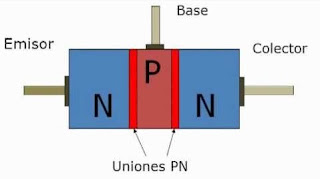

The transistor consists of three parts artificially doped (contaminated with specific materials in specific quantities) that form two bipolar junctions: the emitter that emits carriers, the collector that receives or collects them, and the third, which is sandwiched between the first two, modulates the passage of said carriers (base).
Unlike valves, the transistor is a current-controlled device from which amplified current is obtained. In circuit design, transistors are considered an active element, unlike resistors, capacitors, and inductors that are passive elements.
Thats all for today. This time it was theory, I hope you liked and interested. See you at the next post!
Here are some videos that I hope will make it clearer:
martes, 28 de abril de 2020
Audioguía - Tipos de contenedores
Hello everyone! This time I come with an app in which you can differentiate what type of waste to throw into each container. It will be of little use to you with this quarantine. But as soon as we all go out into the street, we should give the planet a smile to show that it is not necessary for us to put us all at home so as not to make it unhappy JAJA. WE CAN GET IT !!
Here are some screenshots from the app:
Design

Code

domingo, 19 de abril de 2020
Recipe: Spaghetti a la carbonara
Hello to everyone! Today we are going to make a recipe with Google Documents of our favorite recipe. One of mine is "spaghetti a la carbonara". I love the taste of it, so I decided to make the recipe for this dish so special to me.
If you want to try preparing the dish or see how the document has turned out, you can see it here.
This is a screenshot in which I show the recipe, but if you want to enlarge it or see it more clearly I recommend that you visit it:

miércoles, 15 de abril de 2020
Spanish digital company
Nowadays digitization is almost unstoppable, as Carlos López Blanco indicates: "Customers are more digital every time and therefore the way they do everything is changed, this is the nature of the challenge." Opportunity, competitiveness and innovation are part of the benefits derived from digitization.
All companies are affected by digitization and those who do not assume that this is a challenge they have to face will have many problems ”as Carlos López Blanco has pointed out again.
All companies are affected by digitization and those who do not assume that this is a challenge they have to face will have many problems ”as Carlos López Blanco has pointed out again.
domingo, 12 de abril de 2020

sábado, 28 de marzo de 2020
My Collage
Hello everyone! I hope you are all doing well with the Covid-19. It will pass soon, I'm sure. I have come back to teach you a new activity that I have done from TICO. It is a collage about me with various colors. So it looks more striking. If you want to learn how it is done, here my teacher teaches you. I hope you like it and that you are all well. Until next time!


lunes, 16 de marzo de 2020
Servomotor with tinkercad
Hi! Good morning!
How are you? we are not currently going to school because of the Covid - 19, but despite that, we continue teaching at distance thanks to the Google tecnology XD. This time we are working with tinkercad doing a servomotor (a servomotor converts mechanical motion (shaft turns) into digital pulses interpreted by a motion controller. They also use a driver, which together form a circuit to command position, torque and speed) If you want to see it, click here
here are a couple of screenshots:
The circuit
 Command to work the circuit

How are you? we are not currently going to school because of the Covid - 19, but despite that, we continue teaching at distance thanks to the Google tecnology XD. This time we are working with tinkercad doing a servomotor (a servomotor converts mechanical motion (shaft turns) into digital pulses interpreted by a motion controller. They also use a driver, which together form a circuit to command position, torque and speed) If you want to see it, click here
here are a couple of screenshots:
The circuit


miércoles, 26 de febrero de 2020
Statistics with Google sheets
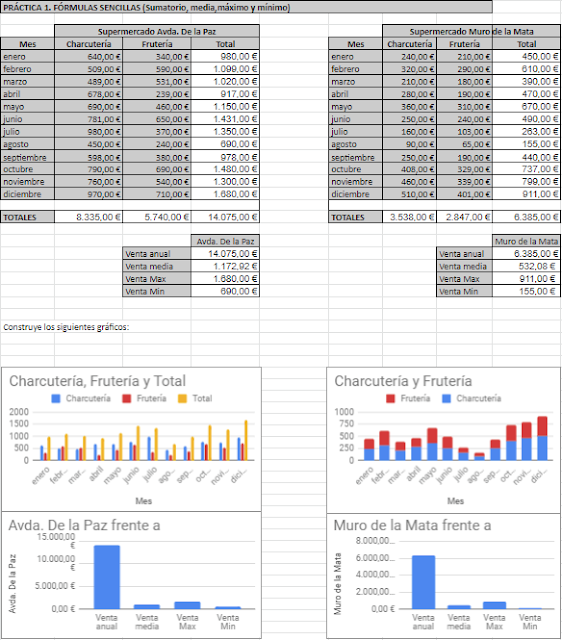
Practice 1 - Statistics with Google Sheets
Open the following spreadsheet and fill in the statistics using the addition button:
Highlight the cells in which you want to perform calculations:
Total
Average
Minimum (MIN)
Maximum (MAX)
And Graphics
The final result must be:
Open the following spreadsheet and fill in the statistics using the addition button:
Highlight the cells in which you want to perform calculations:
Total
Average
Minimum (MIN)
Maximum (MAX)
And Graphics
The final result must be:

miércoles, 12 de febrero de 2020
Información sobre distintas cosas de internet
Hoy vamos a dar más teoría que práctica, en la que debemos explicar gracias al servidor las siguientes palabras. Espera..., ¿Quieres saber qué es el servidor? No te preocupes, aquí abajo lo puedes saber. Espero que disfrutes viendo justo lo que actualmente estamos aprendiendo en el C.E.I.P.S.O. San Sebastiánm :)
-Ordenador cliente: Es una aplicación informática o un ordenador que consume un servicio remoto en otro ordenador conocido como servidor, normalmente a través de una red de telecomunicaciones.
 -El número IP: Cuando se quiere acceder a una página web en Internet se necesita la dirección IP del servidor.El IP es un número que identifica un dispositivo en una red (o en la red de redes, esto es, en internet).

-ISP: Es el Proveedor de Servicios de Internet, es decir, a la empresa que vende a los usuarios la conexión a Internet.

-Servidor: Es una aplicación en ejecución capaz de atender las peticiones de un cliente y devolverle una respuesta en concordancia.
 -Servidor DNS: Es un sistema de nomenclatura jerárquico que se ocupa de la administración del espacio de nombres de dominio. Su labor primordial consiste en resolver las peticiones de asignación de nombres.
 -Número mac: La dirección MAC es un identificador único que cada fabricante le asigna a la tarjeta de red de sus dispositivos conectados, desde un ordenador o móvil hasta routers, impresoras u otros dispositivos como tu Chromecast.


-Ordenador cliente: Es una aplicación informática o un ordenador que consume un servicio remoto en otro ordenador conocido como servidor, normalmente a través de una red de telecomunicaciones.


-ISP: Es el Proveedor de Servicios de Internet, es decir, a la empresa que vende a los usuarios la conexión a Internet.

-Servidor: Es una aplicación en ejecución capaz de atender las peticiones de un cliente y devolverle una respuesta en concordancia.


sábado, 8 de febrero de 2020
Arkanoid game
Finally I'm doing another game with Scratch (is the one I like the most). This time I created "arkanoid" game that will bring more nostalgia to the most of the people who play it, but I have put this arkaid even with a short story. The game is in progress and it will take a long time to be finished, but if you can't take it anymore without trying it, here you have it for you to try, for you to enjoy and for you to rate it in the blog comments. I hope you enjoy it! :) By the way, you would help me a lot if you tell me about any bug or error in the game so I can fix it. Thank you
some screenshots of the game:


 Can you beat me or even win? Try it
some screenshots of the game:


miércoles, 22 de enero de 2020
Four in line
Hello to everybody!!!!
If you need to entertain yourself with any friend, you can play this totally free game created by me and with the help of my teacher (www.davidlobotic.blogspot.com) on Scratch.
Its a digital "four in line"!
Click here to play it!!
Here are a couple of screenshots to give you an idea of what it is like before you start playing:


If you need to entertain yourself with any friend, you can play this totally free game created by me and with the help of my teacher (www.davidlobotic.blogspot.com) on Scratch.
Its a digital "four in line"!
Click here to play it!!
Here are a couple of screenshots to give you an idea of what it is like before you start playing:


Advantages and disadvantages of playing video games
Hello! There are a lot of people who like to play video games (I am one of them XD), obviously, playing video games has nothing wrong, but as you know, everything in excess is bad for your health, and this is no exception. Therefore, today I am going to tell you some of the good things about playing video games and the cons of this:
Advantages

-They develop the instinct to overcome the child.
-They increase your reasoning speed and stimulate your concentration.
-They develop their reflexes and mental agility and improve manual coordination.
-Promote teamwork in the case of multi-player games.
-Many are designed for educational purposes, so, while playing, they learn about all kinds of disciplines.
-Plays in family, can help strengthen ties and spend super fun evenings.
Disadvantages

-Like television, video games have become the target of all criticism for the potential dangers they entail. It is true that, if his only fun is to play with the console, the child will end up becoming an addict, showing constant signs of anxiety and nervousness. This dependence will also stop you from interacting with your friends and paying attention to your surroundings.
-Children may be exposed to content unfit for their age, because some video games contain scenes of sex, violence, play, use foul language, and so on.
-There is a risk of being overweight or obese due to the sedentary lifestyle that most videogames force. Hence the good reception that have had the games that force you to move or practice a sport.
-By connecting with other players through the Internet, they can meet undesirable people or provide data that they shouldn't.
-One last drawback: consoles are expensive products, and video games, too.
Advantages

-They develop the instinct to overcome the child.
-They increase your reasoning speed and stimulate your concentration.
-They develop their reflexes and mental agility and improve manual coordination.
-Promote teamwork in the case of multi-player games.
-Many are designed for educational purposes, so, while playing, they learn about all kinds of disciplines.
-Plays in family, can help strengthen ties and spend super fun evenings.
Disadvantages

-Like television, video games have become the target of all criticism for the potential dangers they entail. It is true that, if his only fun is to play with the console, the child will end up becoming an addict, showing constant signs of anxiety and nervousness. This dependence will also stop you from interacting with your friends and paying attention to your surroundings.
-Children may be exposed to content unfit for their age, because some video games contain scenes of sex, violence, play, use foul language, and so on.
-There is a risk of being overweight or obese due to the sedentary lifestyle that most videogames force. Hence the good reception that have had the games that force you to move or practice a sport.
-By connecting with other players through the Internet, they can meet undesirable people or provide data that they shouldn't.
-One last drawback: consoles are expensive products, and video games, too.
miércoles, 15 de enero de 2020
Casa ecologista
After all, ¡Happy New Year!
I still remember when I started this blog in my class, and all the things I've done in 2019 (like to start with this blog). I hope this 2020 is full of good news for everyone. By the way, thanks to all who have visited my blog in this 2019 and also to those who are currently visiting :)
You can see it here
Here are the screenshots of how it looks:


I still remember when I started this blog in my class, and all the things I've done in 2019 (like to start with this blog). I hope this 2020 is full of good news for everyone. By the way, thanks to all who have visited my blog in this 2019 and also to those who are currently visiting :)
You can see it here
Here are the screenshots of how it looks:


viernes, 13 de diciembre de 2019
CitySink app
I did a new app to calculate when will the cities sink.
Click here to download or analyze the QR code:
 Enjoy it...
Aquí hay algunas capturas:


Click here to download or analyze the QR code:
Aquí hay algunas capturas:


miércoles, 20 de noviembre de 2019
¡¡Un nuevo blog!!
Estos último días he estado configurando un nuevo blog con Google Sites en el cual he añadido:
1. He creado dos nuevas páginas en nuestro sitio web: Office y Scratch
2.Agregamos los enlaces explicativos de nuestro blog.
3.He puesto la hoja de cálculo, el documento y la presentación en la página de Office.
Pulsa aquí para verlo. Espero que te guste :)
1. He creado dos nuevas páginas en nuestro sitio web: Office y Scratch
2.Agregamos los enlaces explicativos de nuestro blog.
3.He puesto la hoja de cálculo, el documento y la presentación en la página de Office.
Pulsa aquí para verlo. Espero que te guste :)
¿Cómo funciona el ordenador?
¿Cómo funciona el ordenador?
¡Hola a todos/as!
Hoy os vamos a explicar de una manera sencilla el funcionamiento del ordenador.
El ordenador es una especie de "esclavo" al cual ordenamos cosas (reproducir una foto, imprimir un documento, reproducir una canción, ir a una página web) y el ordenador se preocupa de conseguir lo que le pedimos usando su cerebro (procesador, memorias RAM y ROM), su experiencia (programas instalados) y sus medios (altavoces, pantallas, impresoras).
A un esclavo le tenemos que hablar en el idioma que entiende, el ordenador habla el lenguaje binario:
Letras o bits: sólo dos el "0" y el "1"
Palabras o bytes: Con una longitud fija, actualmente cada palabra tiene 64 letras o bits.
Los bits no se transmiten mediante voz, sino por corrientes eléctricas, es decir, cuando hay corriente es un "1" y cuando no hay corriente es un "0".
Los bytes significan distintas cosas:
Una posición de un pixel.
Un color.
Una nota de música.
Una orden (enviar al monitor, enviar a la impresora, abrir el navegador, abrir un programa).
Un reconocimiento (se ha pulsado la tecla "a", se ha pulsado el icono de Whatsapp)
Por todo ello las fotos, ocupan Mbytes (millones de bytes o palabras binarias), al igual que las canciones, los vídeos, o los documentos de Word.
El ordenador utiliza la Electricidad. Es un simple flujo de electrones, partículas subatómicas con carga negativa, pero que increíblemente consigue realizar muchas funciones gracias a los dos tipos de electrónica:
Electrónica analógica: Usa la propiedades físicas de la electricidad como la fricción y el electromagnetismo para producir calor, luz, sonido, movimiento, captación de sonido, coloración de bombillas, etc.
Electrónica digital: Utiliza la corriente (1) y la no corriente (0) para construir el lenguaje binario, que contiene letras o bits y palabras o bytes capaces de interpretar órdenes, analizarlas y generar soluciones para las órdenes primigenias
¡Hola a todos/as!
Hoy os vamos a explicar de una manera sencilla el funcionamiento del ordenador.
El ordenador es una especie de "esclavo" al cual ordenamos cosas (reproducir una foto, imprimir un documento, reproducir una canción, ir a una página web) y el ordenador se preocupa de conseguir lo que le pedimos usando su cerebro (procesador, memorias RAM y ROM), su experiencia (programas instalados) y sus medios (altavoces, pantallas, impresoras).
A un esclavo le tenemos que hablar en el idioma que entiende, el ordenador habla el lenguaje binario:
Letras o bits: sólo dos el "0" y el "1"
Palabras o bytes: Con una longitud fija, actualmente cada palabra tiene 64 letras o bits.
Los bits no se transmiten mediante voz, sino por corrientes eléctricas, es decir, cuando hay corriente es un "1" y cuando no hay corriente es un "0".
Los bytes significan distintas cosas:
Una posición de un pixel.
Un color.
Una nota de música.
Una orden (enviar al monitor, enviar a la impresora, abrir el navegador, abrir un programa).
Un reconocimiento (se ha pulsado la tecla "a", se ha pulsado el icono de Whatsapp)
Por todo ello las fotos, ocupan Mbytes (millones de bytes o palabras binarias), al igual que las canciones, los vídeos, o los documentos de Word.
El ordenador utiliza la Electricidad. Es un simple flujo de electrones, partículas subatómicas con carga negativa, pero que increíblemente consigue realizar muchas funciones gracias a los dos tipos de electrónica:
Electrónica analógica: Usa la propiedades físicas de la electricidad como la fricción y el electromagnetismo para producir calor, luz, sonido, movimiento, captación de sonido, coloración de bombillas, etc.
Electrónica digital: Utiliza la corriente (1) y la no corriente (0) para construir el lenguaje binario, que contiene letras o bits y palabras o bytes capaces de interpretar órdenes, analizarlas y generar soluciones para las órdenes primigenias
Elementos del ordenador
Buenos días, hoy nos toca realizar una entrada en vuestro blog con lo que hemos aprendido en clase sobre las partes del ordenador:
Título: Partes del ordenador
Primera foto: Esquema de las partes del ordenador
Texto: Incluir las principales partes del ordenador, cada una con su definición y foto, mirar 3 páginas webs distintas, poner el enlace.
Partes: Caja, Placa base, Procesador, Memoria RAM, Memoria ROM, Fuente de alimentación, Tarjeta gráfica, Tarjeta de audio, Monitor, teclado y Ratón.
Bibliografía con enlace a las 3 webs de donde habéis obtenido la información.

Suscribirse a:
Entradas (Atom)